
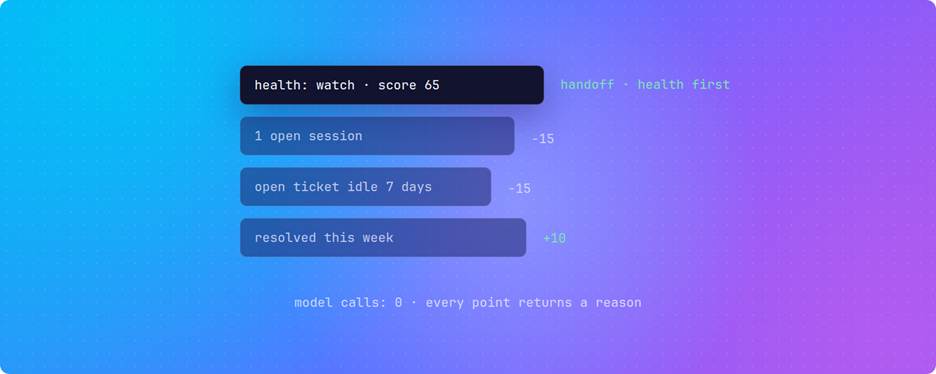
A customer health score is only useful at handoff if the person taking the ticket can check it. Statewave computes one as plain arithmetic. Every customer starts at 100, eight support signals move the number, and each move comes back with its reason. The handoff context pack then places that score next to the live issue, the steps already tried, and a record of what the agent saw.
That design has limits you should know before you wire alerts to it. We ran every feasible combination of the eight signals through the scoring rules, 936 in total. No single signal can drop a customer below 55, and a customer with no open tickets can never reach at_risk. This post covers the arithmetic, why the number moves on quiet days, what the handoff pack keeps when the token budget runs out, and the ingest details that change the score without raising an error.
What does a customer health score measure in AI support?
A customer health score is a single number, usually on a 0 to 100 scale, that summarizes whether an account is in good shape. What feeds the number decides what it can tell you, and the tools support and success teams use feed it very different data.
Relationship scores and support-state scores answer different questions
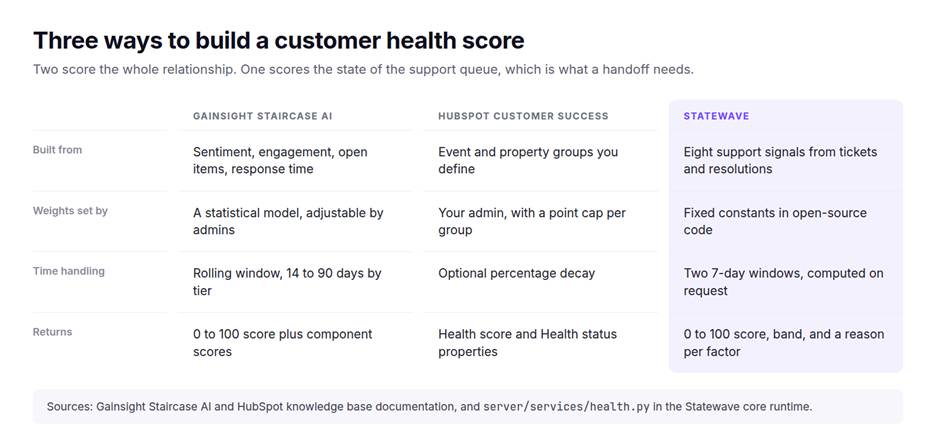
Customer success platforms score the whole relationship. Gainsight's Staircase AI health score combines sentiment, engagement, open items, and response time, with weights set by a statistical model. It also applies lifecycle modifiers: +40 on renewal, −30 on a churn-risk flag, and −100 on a churn notification, each stepping down to half at day 45 and expiring at day 90. HubSpot's customer success workspace lets an admin build a points-based score from event and property groups, with a point cap per group and optional decay.
Statewave's score is narrower on purpose. It reads only the support record: open and resolved sessions, urgency in the conversation, idle tickets, and response and resolution times. That matches the question the next agent has at escalation, which is how this customer's tickets are going right now. Predicting renewal is a different job.
Why fixed rules make sense for a support-state score
TSIA's director of customer success research, introducing TSIA's research series on rebuilding health models, said static rules-based scores give teams a "false sense of security." That criticism is aimed at relationship scores assembled from a few hand-weighted usage metrics. It applies with less force to a support-state score, for two reasons.
The first is data volume. A 2025 Aalto University thesis comparing churn models at a Nordic B2B SaaS company trained on 337 customer records, with a churn rate of about 6% in the market studied. The thesis notes that B2B vendors typically serve far fewer customers than consumer businesses, and a few hundred accounts is thin ground for learning weights from support history alone.
The second is disputability. A score that goes into an escalation brief has to survive a skeptical human during a live incident. Nobody can argue with a learned weight at 2 a.m. A −15 labeled "Session t-102 idle for 7 days" can be checked in ten seconds.
How does Statewave calculate the customer health score?
The rules live in server/services/health.py in the open-source core runtime. The service pulls a subject's resolution records and episodes, applies eight rules, clamps the result between 0 and 100, and assigns a band. There is no model call, no stored score, and nothing cached in the scoring path.
| Signal | Points | Cap | Fires when |
|---|---|---|---|
| Unresolved issues | −15 per open session | −45 | A session's resolution status is open |
| Repeated issue | −20 | Once | An open session and a resolved session share at least 30% of the smaller keyword set |
| Escalations | −10 per episode | −20 | A message contains an urgency marker such as outage, p0, sev1, or escalat |
| Idle open issue | −15 | Once | An open session has had no activity for 7 days |
| Resolution breach | −10 per session | −20 | A resolved session took more than 24 hours from the first customer message |
| Slow first response | −5 | Once | Average first response across sessions is above 10 minutes |
| Recent resolution | +10 | Once | A session was resolved in the last 7 days |
| High resolution rate | +10 | Once | At least 80% of two or more sessions are resolved |
Scores of 70 and above are healthy, 40 to 69 is watch, and anything under 40 is at_risk.
A worked example: one account, five factors
Take a constructed mid-market account, acct_ridgeline, with three tickets. An SSO login loop was fixed in two hours, three weeks ago. A duplicate-invoice export problem took 36 hours to close last week. A warehouse sync to Snowflake has been failing since a schema change, and nobody has updated that ticket in seven days. Scored on day 3 of the eleven-day window we walk through below, the account lands at 65.
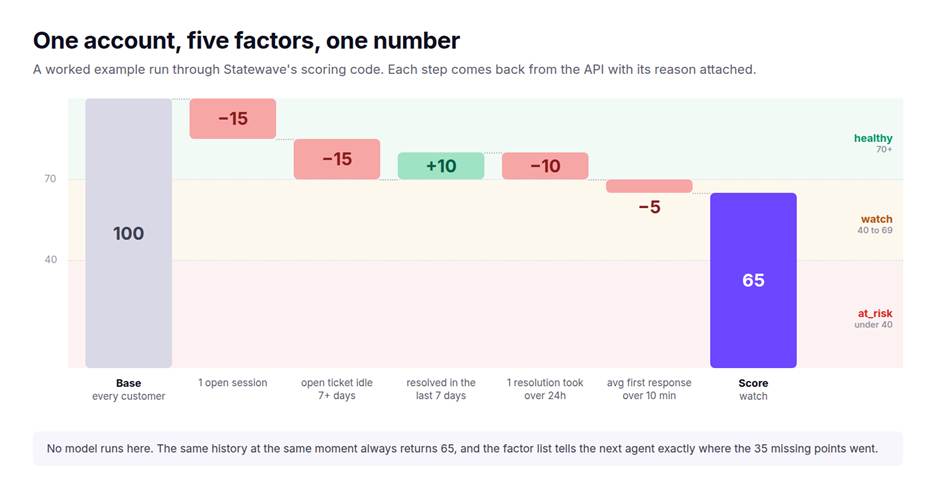
This is the response from GET /v1/subjects/acct_ridgeline/health, produced by running the account's history through the scoring rules:
{
  "subject_id": "acct_ridgeline",
  "score": 65,
  "state": "watch",
  "factors": [
    { "signal": "unresolved_issues", "impact": -15, "detail": "1 open session(s)" },
    { "signal": "idle_open_issue", "impact": -15, "detail": "Session t-102 idle for 7 days" },
    { "signal": "recent_resolution", "impact": 10, "detail": "1 session(s) resolved in last 7 days" },
    { "signal": "sla_resolution_breaches", "impact": -10, "detail": "1 session(s) exceeded 24h resolution SLA" },
    { "signal": "slow_first_response", "impact": -5, "detail": "Avg first response 10.7 min (threshold: 10 min)" }
  ]
}
The factor list matters more than the number. A receiving agent does not need to trust 65. They can see that 30 of the 45 penalty points come from a single stale ticket, and go straight to t-102.
What can actually push a customer into at_risk?
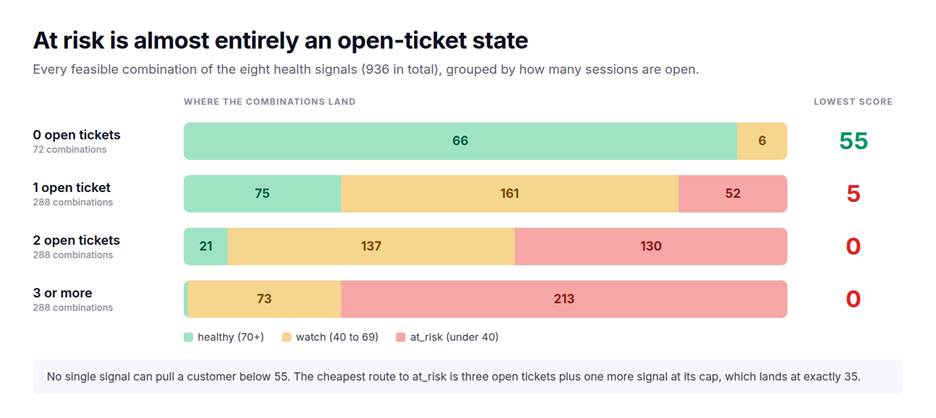
at_risk in Statewave's model is almost entirely an open-ticket state. We enumerated every combination of signal values the rules allow, respecting dependencies such as a repeated issue requiring at least one open session, and scored each with the published constants. That produced 936 feasible combinations.
No single signal can do it
The largest penalty any one signal can apply is 45, from three or more open sessions. That leaves a score of 55, which is watch. Every at_risk customer has at least two different things going wrong.
Zero open tickets means a floor of 55
With no open sessions, the unresolved, repeated-issue, and idle signals cannot fire. The remaining penalties, escalations, resolution breaches, and slow first response, add up to 45 at most. In the enumeration, 66 of the 72 combinations without an open ticket are healthy.
The fastest route is three open tickets plus one full-strength signal
Three open sessions (−45) plus a repeated issue (−20), two urgency episodes (−20), or two resolution breaches (−20) scores exactly 35. With only one open ticket, reaching at_risk takes at least three other signals firing together.
Read an at_risk alert as "this customer's queue needs a person today." Risks that live outside the queue, such as a champion leaving or a renewal slipping, need to reach your team through your customer success platform.
Why does the health score change when nothing happens?
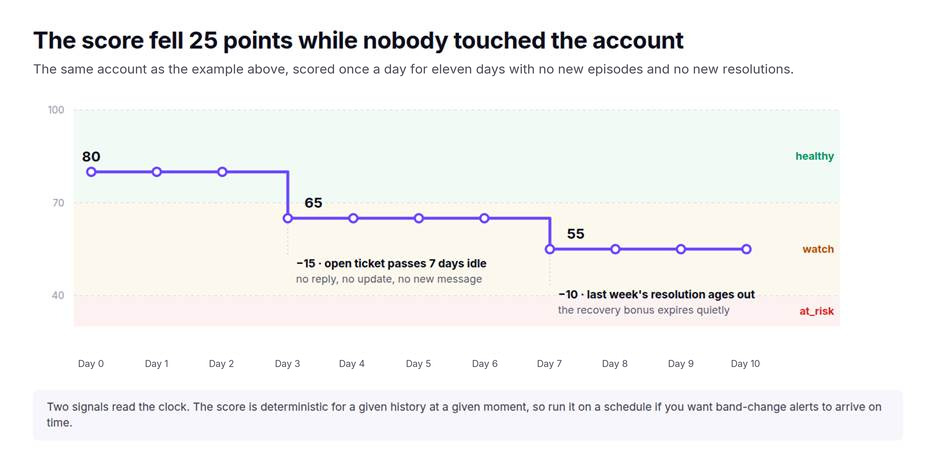
Two of the eight signals read the clock. The idle penalty fires once an open ticket passes seven days without activity, and the recent-resolution bonus expires seven days after a ticket closes. Neither needs a new event.
We scored acct_ridgeline once a day across an eleven-day window, adding no episodes and no resolutions. On day 0 the account sits at 80, healthy. On day 3 the Snowflake ticket crosses seven idle days and it drops to 65. On day 7 last week's invoice fix ages out of the bonus window and it drops to 55.
Urgency markers behave the opposite way: nothing ages them out. The escalation check counts matching episodes regardless of when they were written, so an "outage" message from a ticket that closed long ago can keep costing points. The 20-point cap bounds how much.
Alerts fire only when something asks for the score
Statewave emits subject.health_degraded and subject.health_improved webhooks when a subject's band changes, comparing against the last band it cached (health_alerts.py). The comparison runs only when the score is computed, which happens on GET /v1/subjects/{subject_id}/health and on POST /v1/handoff. In the example above, the drop to watch on day 3 sends nothing until one of those calls runs.
To get band-change alerts on the day they happen, run a scheduled job that requests health for every subject with an open session. If you restrict webhook delivery with STATEWAVE_WEBHOOK_EVENTS, include both health events. One more detail: a subject scored for the first time is compared against a default of healthy, so a new subject whose first score is watch fires health_degraded immediately.
When should you not trust the number?
Don't rely on it when the stakes live outside the ticket queue. Statewave's own eval suite has a clean example. The customer in test_handoff.py is Bob, from Acme Inc on an Enterprise plan. He has two resolved tickets and one open one: a nightly data export failing for three days, a timeout increase that didn't hold, an escalation to engineering, and a compliance team that needs the data by Friday.
Scored the moment that history is recorded, Bob comes out at 85, healthy. The arithmetic is correct: the open session costs 15, the "Escalating to engineering" message costs 10, and the recent resolutions earn a single 10-point bonus. The Friday deadline is not a signal, so the score cannot see it.
That is why the handoff pack puts the active issue and attempted steps directly under the score. Use the band to route work and the brief to set priority. If you run a customer success platform, send the band there as one input next to renewal dates and usage. It is not a churn prediction.
What goes into a handoff context pack?
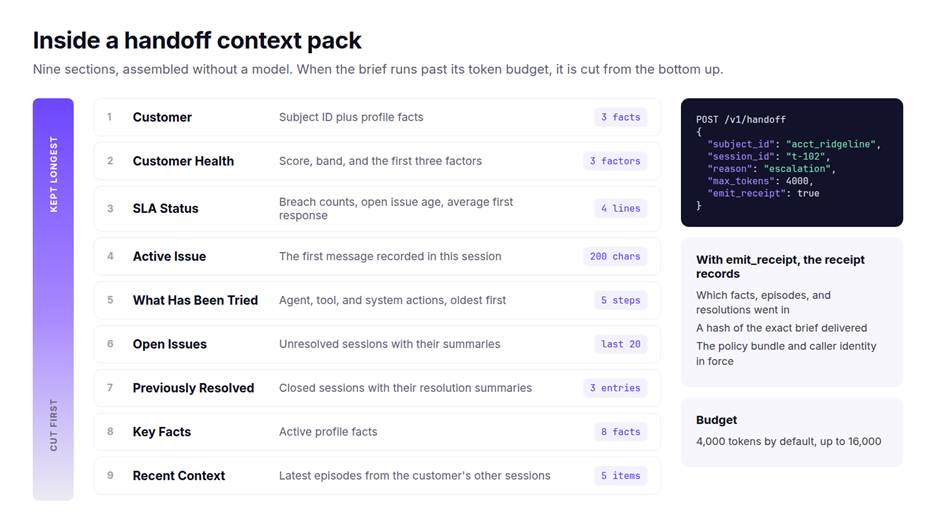
A handoff context pack is a compact brief for the agent or human taking over a session, assembled from memory state instead of a transcript dump. POST /v1/handoff builds it from a subject ID, a session ID, and a reason such as escalation or shift change. The code is in handoff.py. No model call happens during assembly, and the eval suite checks that the same inputs return an identical brief.
Section order is priority order
The brief renders nine sections, then trims to its token budget: 4,000 tokens by default, up to 16,000. Trimming cuts from the end. Customer and health come first so they survive, and recent context from the customer's other sessions is the first thing lost. If briefs are getting cut, raise max_tokens before changing anything else. The mechanics of fitting memory into a fixed budget are covered in token-bounded context assembly.
The health line shows the first three factors, not the largest three
Factors are added in the fixed order the rules run, and the brief keeps the first three. For acct_ridgeline on day 3, that means the open session, the idle ticket, and the recent resolution. The resolution breach and the slow first response still reach the next agent through the SLA Status section directly below. The full factor list is always available from the health endpoint.
Two sections depend on how you record the session
Suchintan Singh, co-founder of Skyvern, summed up agent context in a YC talk: anything you don't record "isn't saved." Handoff packs follow that rule literally.
Active Issue is the first message recorded in the session, cut to 200 characters. If the session opens with "hi," so does the brief. Record the problem statement, or a ticket-created event carrying the subject line, as the first episode.
What Has Been Tried lists agent, tool, and system actions, plus assistant replies, oldest first, and keeps five, each cut to 150 characters. On a ticket with a long attempt history, the most recent attempts are the ones left out, so a specialist picking up a long-running ticket should pull the session timeline for anything past step five.
A receipt answers "what did the agent see?"
Pass emit_receipt: true, or set receipts to always emit for the tenant, and the handoff writes an immutable receipt tagged handoff:{reason}:{session_id}. It records the facts, episodes, and resolutions that went into the brief, a hash of the exact text delivered, the policy bundle in force, and the caller. When a human reviews an escalation the AI mishandled, that record replaces guesswork. The chain back to source episodes is explained in agent memory provenance.
Two governance details apply here. Profile facts pass through the same sensitivity-label policy as /v1/context before they enter the brief, and a tenant with require_caller_identity rejects handoff calls that omit caller_id and caller_type with a 401. Active Issue and What Has Been Tried quote raw episode text, so redact sensitive values at ingest. Governing what the model actually sees covers where those controls belong.
You can generate a pack against realistic support data in a few minutes. npx @statewavedev/statewave boots Statewave in demo mode, with the API, admin console, and Postgres running locally. The eval-support-agent suite then seeds customers like Bob and asserts on health bands, compact factors, and handoff determinism.
When the handoff is agent to agent
A triage bot passing a ticket to a specialist agent needs the same brief a human would. The handoff request accepts task_id and parent_receipt_id alongside the caller fields, so the handoff receipt can sit in the same audit trail as the rest of the run.
Three demos show the surrounding patterns. statewave-multi-agent-shared-context has parallel agents reading and writing one shared subject, so a decision made by one is visible to the other before it acts. statewave-multi-agent-memory shows the compiler catching contradictory facts from different agents and superseding the stale one. statewave-personal-assistant is the smallest reference for wrapping each turn with a context call before the model and an episode record after it.
What quietly breaks the health score in production?
Mismatches between how your ingest path records support data and the fields the rules read. None of them raise an error, and each one shifts the score.
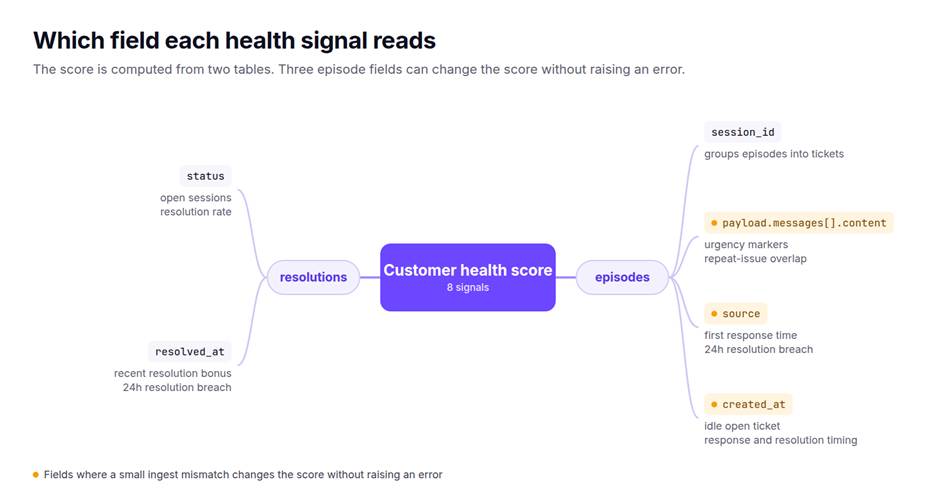
We reproduced each of the first three with the scoring rules in health.py:
| What you see | Why it happens | What to do |
|---|---|---|
| An outage ticket scores like a routine one | The escalation and repeated-issue checks read payload.messages[].content. Text sent as payload.text is skipped. An open ticket reading "Full outage, P0" scored 85 as text and 75 as messages. | Record support turns in the messages shape. |
| A 48-hour resolution costs no points | The score's timing checks recognize user, chat, and support-chat as customer sources, and assistant, agent, system, and tool as responders. The /sla endpoint also accepts names like customer and staff, but the score does not. The same history scored 100 with customer and staff, and 95 with user and agent. | Normalize source names at ingest. |
| Billing questions count as escalations | Urgency markers are substring matches, so "download" contains "down." | Don't alert on the escalations factor alone. The 20-point cap limits the effect. |
| Scores run high right after a bulk import | Idle and timing checks read created_at, which is ingest time. resolved_at is set when the resolution is written. Backfilled tickets look answered in seconds and resolved today. | Backfill before go-live, or hold health alerts for seven days after an import. |
| Long-standing customers drift into watch | Tickets are never closed, so open-session penalties stack toward 45 and the resolution bonuses never fire. | Write a resolution when each ticket closes. |
The last row is the most common and the cheapest to fix. The resolution summary written at close is also what lets a prior fix resurface, which is covered in repeat-issue detection in customer support automation.
How do you wire health scoring and handoff into a support agent?
Six steps, most of them decisions about what your ingest path records. The recording and retrieval loop itself is covered in how to add persistent memory to your AI support agent.
- Use a stable subject ID. A CRM account ID or account UUID, never the chat session ID. If you serve more than one customer organization, read which surfaces need a tenant boundary first.
- Record every turn with a session ID, the messages shape, and a normalized source. The request shape is below.
- Write a resolution with a summary when a ticket closes.
POST /v1/resolutionswithstatus: resolvedand aresolution_summary. If ticket history arrives through a connector, confirm each ticket maps to a session and that closing it writes a resolution. - Request health on a schedule. Once a day for every subject with an open session is enough to catch both clock-driven changes, and it keeps the band-change webhooks on time.
- Call
/v1/handoffat escalation. Pass the reason, the caller identity, andemit_receipt: true, attachhandoff_notesto the ticket, and store thereceipt_id. - Run the eval suite before real traffic. Session-aware ranking, which decides what the agent sees before any handoff, is covered in why session state beats more memory. Head-to-head results are on the benchmarks page.
POST /v1/episodes
{
  "subject_id": "acct_ridgeline",
  "session_id": "t-102",
  "source": "user",
  "type": "message",
  "payload": { "messages": [{ "role": "user", "content": "Warehouse sync to Snowflake failing since the schema change" }] }
}
You can now read a Statewave customer health score the way its code computes it: what can move it into at_risk, why it drifts on quiet days, and what the handoff pack keeps under a tight budget. Start with one account that has an open ticket. Call the health endpoint and check each factor against the ticket history. It takes about ten minutes and tells you whether your ingest path records what the rules read.
Boot Statewave locally and generate your first handoff pack, or read health.py and handoff.py in the Apache-2.0 core runtime.
We build Statewave, so treat the framing as ours and the numbers as checkable. The enumeration and the simulations ran the published scoring rules in health.py, and every constant above is named in the core runtime.
FAQ
1. What is a good customer health score?
In Statewave, 70 or above is healthy, 40 to 69 is watch, and under 40 is at_risk. The band matters more than the exact number, because the factor list explains every point and the webhooks fire on band changes. Other platforms let admins set their own thresholds, so compare bands rather than raw scores across tools.
2. Does Statewave's customer health score use AI or machine learning?
No. The score is fixed arithmetic over support signals, with no model call and nothing stored in the scoring path. The same history at the same moment always returns the same score and the same factors, which is what makes it safe to put in an escalation brief.
3. How often is the customer health score updated?
It is computed on demand, each time you call the health endpoint or generate a handoff pack. Because two signals depend on elapsed time, the score can change between calls without new activity. Run a scheduled health request for accounts with open tickets if you need timely alerts.
4. Can I change the health score weights or thresholds?
Not through configuration. The weights, caps, and 70 and 40 band thresholds are constants in health.py, so changing them means running a modified build. The separate /v1/subjects/{subject_id}/sla endpoint does accept custom first-response and resolution thresholds as query parameters.
5. How is a handoff context pack different from an AI-written conversation summary?
A handoff pack is assembled from stored memory and ticket state without calling a model, so it cannot invent a detail that was never recorded. It stays inside a fixed token budget, keeps sections in priority order, and can emit a receipt that records exactly what was delivered. A model-written summary can read more smoothly, but it cannot show you afterward what it left out.
Stay in the loop
Get new Statewave posts by email.
Along with occasional Statewave updates. Unsubscribe anytime — privacy.